

Work Permit Software
Paperless PTW for Compliant, Controlled Work Execution.
Ensure high-risk activities are planned, authorised and executed safely through digital permits, automated approvals and real-time tracking using NIST’s Work Permit Software.
Expertise

HSE specialists.
What this Work Permit Software Delivers?
NIST Work Permit Software provides paperless, digital control of high-risk work through a centralised PTW platform with automated workflows, real-time status, approvals and alerts. It ensures no work starts without proper authorisation and defined risk controls, helping to reduce manual errors and prevent unauthorised or unsafe work.
Digital audit trails, dashboards and analytics strengthen regulatory alignment and provide continuous improvement insights for both safety performance and operational efficiency.
01

Digital Process
The Work Permit Software replaces manual, paper-based permit processes with a completely digital workflow. Permits are created, reviewed, and approved online guaranteeing consistency, reducing paper work and removing the risk of lost or incomplete forms.
02
Built-in Safety Compliance
Mandatory safety checks, risk controls and authorisation steps are embedded into every permit type. This ensures that critical safety requirements are not bypassed and that each high-risk activity is authorised in line with site procedures and regulatory expectations.
03
Customisable Templates
Permit templates can be customized for types of work such as hot work, cold work and confined space entry. Each template can contain specific fields, checklists and precautions to allow an organisation to adjust the PTW process to its own standards and client requirements.
04
Real-time Tracking
The system provides real-time visibility of permit status, validity, and location across active jobs. Supervisors and safety teams can view this information immediately to ascertain which permits are open, rejected or closed, providing improved control of continuing higher risk work.
05
Analytics & Trends
Interactive dashboards illustrate permit volumes, delays, trends and bottlenecks. This analytics provides a means for safety and operations teams to control and improve PTW planning, while also identifying issues that recur in higher risk activities.
06
Integration Ready
The Work Permit Software can integrate with incident management, asset management, HR and ERP systems. This creates a connected EHS ecosystem where permit data supports investigations, equipment planning, workforce allocation and compliance reporting.
07
Audit and Reporting
All actions, approvals, changes and closures are time stamped, and tracked automatically creating a strong digital audit trail. Organizations can create detailed reports of the PTW process for internal reviews, client audits and regulatory inspections.
08
Mobile & Web Access
Permits can be reviewed, approved and monitored from desktop, mobile or tablet. Field personnel, supervisors, and safety officers can manage permits from the field or on-the-go, enabling the PTW process to keep pace with realities in the field.
How it Functions & Key Features
Permit Request
Permits are created via standardised standard templates, which captures job information, location, duration, and personnel responsible. Safety checklists are built-in, ensuring all necessary information or precautions are stated from the very start.
Risk Assessment
Before the approval process begins, risks of the job are recognised and assessed. Appropriate controls such as isolation, PPE, gas testing or supervision levels are defined and captured as part of the PTW process.
Approval Workflow
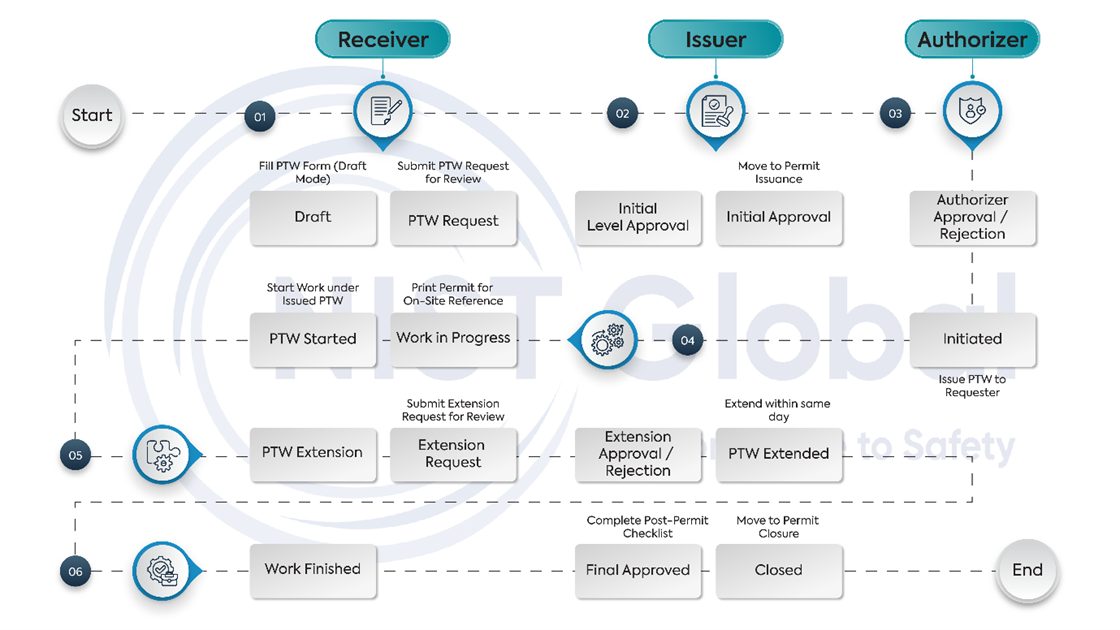
The system has an organisation multi-level approval process that routes the permit to the appropriate roles, area in-charge, supervisor, and safety officer. The digital sign-off ensures that approval has been documented in line with PTW requirements and can be traced and time-stamped.
Permit Execution
Once approved, active permits can be monitored in real time. The system provides visibility of ongoing high-risk work, required safety precautions and permit validity, helping supervisors and safety teams maintain control during execution.
Permit Closure
On completion of the job, the work area is inspected, controls are normalised and any post-work checks are carried out. The permit is then closed with digital confirmation that the work has been completed safely and in compliance with PTW requirements.
Reports & Dashboards
Configurable reports and dashboards present key performance, compliance and safety metrics related to the PTW process. These insights support management reviews, help identify improvement areas and demonstrate effective control over high-risk work.
How the Digital PTW Process Flows
Work Permit
Templates
Standard permit types designed for our clients.
Cold Work Permit
Authorises non-hot, non-sparking activities where fire and explosion risks are low but controlled conditions are still required.
Hot Work Permit
Regulates welding, cutting, grinding and other ignition-producing tasks with potential heat, flame or spark-related hazards.
Excavation Permit
Governs digging, trenching and underground work where there is a risk of collapse, utility interference or ground instability.
Electrical Work Permit
Manages work on or near electrical systems, panels or live equipment where electrical shock, arc flash or energy hazards may be present.
Work at Height Permit
Covers tasks performed at height using ladders, scaffolds, platforms or MEWPs where there is a potential for falls.
Radiography Permit
Controls industrial radiography and related activities involving the planned use of ionising radiation sources.
Work Permit Software FAQ's
1. What exactly is the Work Permit Software?
It’s a digital application that facilitates the issuance, approval, and documentation of permits digitally, eliminating the use of paper forms and Excel sheets. Everything happens online—from request to approval to closure—with built-in safety checks.
2. Why Choose NIST Global’s Work Permit Software?
With 17+ years of HSE experience, we offer custom-made, industry-specific work permit software that solves real problems while remaining technically powerful and easy to use.
3. What types of permits can I manage?
A wide range including Hot Work, Cold Work, Confined Space/Vessel Entry, Excavation, Electrical Work, Work at Height and Radiography.
4. How does the approval process work?
In the application, permit requester submits a permit detailing the task, associated hazards and proactive risk controls. The permit is reviewed by designated personnel (supervisors and safety officers) to verify safety and compliance before issuance. Upon work completion, permit is closed by designated reviewers after validating safety aspects of the site.
5. Can I use it on my phone?
Yes, it allows you to manage all permit activities - raising, reviewing, or approving- directly from your mobile phone or tablet anytime, anywhere
6. How does it help with compliance?
To ensure compliance, the software is designed to enforce mandatory safety checks, maintain digital audit trail, and generate reports automatically.
7. What kind of reports can I get?
You’ll see comprehensive dashboards and analytics on permit status, compliance, and safety performance. This is to enable supervisors and safety officers to make informed decisions and enhance workplace safety
8. Does it connect with other tools we use?
Absolutely. It’s integration ready for incident management, asset management, and HR systems, so you don’t have to juggle multiple platforms.
9. How will this improve efficiency?
No more paperwork, no more delays. Faster approvals, real time monitoring, and reduced admin effort mean your team spends more time on actual work — safely.
10. How do I get started?
Easy. Just book a demo and see the system in action. Our team will walk you through setup and customization for your organization.