

Safety Observation Software
Turn Every Observation into a Safer Workplace – Capture, Assign, and Close Observations Fast.
Our Safety Observation Software enables organizations to record and have control of unsafe acts, unsafe conditions, near misses, and positive safety behaviors digitally. Observations can be made by employees, contractors, and even the general population with only a few clicks.
Expertise

NIST’s Safety Observation Software assists organizations in reacting swiftly to safety issues, identifying trends, and limiting preventive actions. A single digital system ensures transparency and accountability throughout the observation lifecycle.
Every observation is automatically designated to the accountable individual and followed to completion to assist the teams with the prevention of incidents and enhancement of the safety culture.
By centralizing all observations in a single platform, the management will be able to point out the areas of high risk, track the performance, and push the organization towards continuous safety advancement.
What this Safety Observation Software Delivers
01

Proactive Risk Control
Early identification of the possible hazards through spotting unsafe acts and conditions. Detect the threats before their impact turns into significant events. Give teams the authority to be creative and minimise accidents at work.
02
Faster Closures, Clear Ownership
Autonomously adjudicate the observations to the correct domain in charge. Real-time monitoring of open, in-progress, and closed actions. Make sure accountability and timely resolution are done without manual follow-ups.
03
Stronger Safety Culture
Promote the participation and communication of everyone in safety. Recognize good behavior and compensate for good catches. Create a culture of interaction, awareness, and collective responsibility.
04
Compliance & Audit Ready
Keep a comprehensive electronic log of every observation and action. Adequate audit preparations through evidence-based documentation. ISO 45001 and other standards of HSE can be supported easily.
05
Insights and Continuous Improvement
Dashboards give real-time monitoring of the trends, high-risk categories, response time, and closure rates. Determine the routine problems and the best safety practices to reinforce the safety culture in general. Get practical knowledge that leads to ongoing workplace changes.
06
Mobile & Web Access
Submit, review, and monitor observations anytime, anywhere via mobile or web. Quick reporting ensures no observation is missed, even in remote or field locations. Enable teams to stay connected and take timely action wherever they are.
How it Functions & Key Features
Multi-Channel Reporting
Capture observations from mobile, tablet, or desktop – even directly in the field. Ensure every observation is logged quickly and conveniently, no matter where it occurs. Streamline reporting across all teams and locations.
Photo & Evidence Upload
Attach images, videos, or documents to show exactly what’s happening on site. Improve clarity, prioritization, and decision-making for safety actions. Make observations more actionable with visual evidence.
Custom Categories & Risk Levels
Configure observation types, risk ratings, and workflows to match your organization’s safety needs. Adapt the platform to your unique processes and industry requirements. Ensure consistency and relevance in all reports.
Action & CAPA Management
Deliberate remedial and preventive measures, time constraints, mail notifications, and track completion. Make sure that there is accountability among the stakeholders. Close the loop efficiently with a fully digital process.
Real-Time Dashboards & KPIs
One view in dashboards shows the total observations, open and closed items, high-risk items, and leading indicators or lagging indicators. Obtain practical ideas to focus on safety enhancement. Create evidence-based choices to improve safety on an ongoing basis.
Cloud-Based & Secure
Secured cloud-based storage allows access to the platform anywhere, at any time. Be sure of access control and data protection of roles. Store your safety observations in a safe, centralized, and available location.
How does the Safety Observation Process flow?
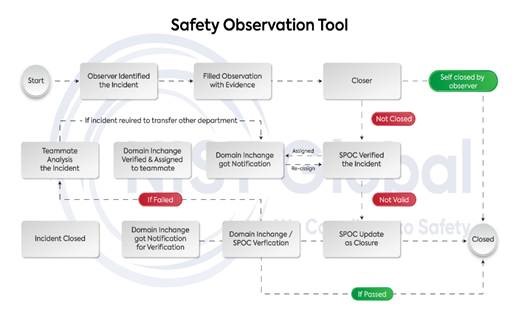
How It Works From Observation to Action
| Step | Stage | Description |
|---|---|---|
| 1 | See It | Anyone on site notices an unsafe act, unsafe condition, or near miss. |
| 2 | Capture It | The user opens the app, enters brief details, selects a category and location, and attaches a photo. |
| 3 | Submit It | With one tap, the observation is logged into the system. |
| 4 | Auto-Assign | The system automatically assigns the observation to the relevant domain in charge based on predefined rules (area, department, category). |
| 5 | Act & Close | The domain in charge investigates, implements corrective or preventive actions, and closes the observation. |
| 6 | Analyse & Improve | Dashboards show trends, recurring issues, response time, and closure rates to support continuous improvement. |
Who Is It For?
It scales from single-site teams to multi-location enterprises, adapting to your workflow and safety requirements.
The Safety Observation Software is ideal for all industries and site types:
Manufacturing
Construction
Warehousing & Logistics
Retail & Offices
Hospitals & Labs
QR-code-based access for easy reporting
Simple forms for capturing observations, photos, and location details
Automatic notification to responsible persons for review and action
Stage-wise closure tracking until the issue is resolved
Safety Observation Software FAQ's
1. Who can submit a safety observation?
Any authorized user – including employees, contractors, and concerned members of the public – can log observations through the app or web portal.
2. What types of incidents can be reported?
The tool supports reporting of unsafe acts, unsafe conditions, near misses, positive safety behaviors, and environmental or health-related concerns.
3. How are observations assigned?
Each observation is automatically routed to a domain in charge based on the site, department, or category selected. This ensures clear ownership and faster closure.
4. Is it possible to add photos and documents?
Yes. Users have an option of uploading photos and other supplementary materials in order that the safety or operations team would have a clear picture of the problem prior to visiting the site.
5. Is the software useful in auditing and compliance?
Absolutely. It always stores an accurate digital record of all observations, actions, and closures that can be used as evidence in case of internal and external audits, and assures the organization's compliance with the typical safety standards, such as ISO 45001.
6. Does it work with small groups and large businesses?
Yes. The tool is cloud-based and scalable, making it suitable for single sites, multi-location operations, and large enterprises. You can start small and expand as adoption grows.